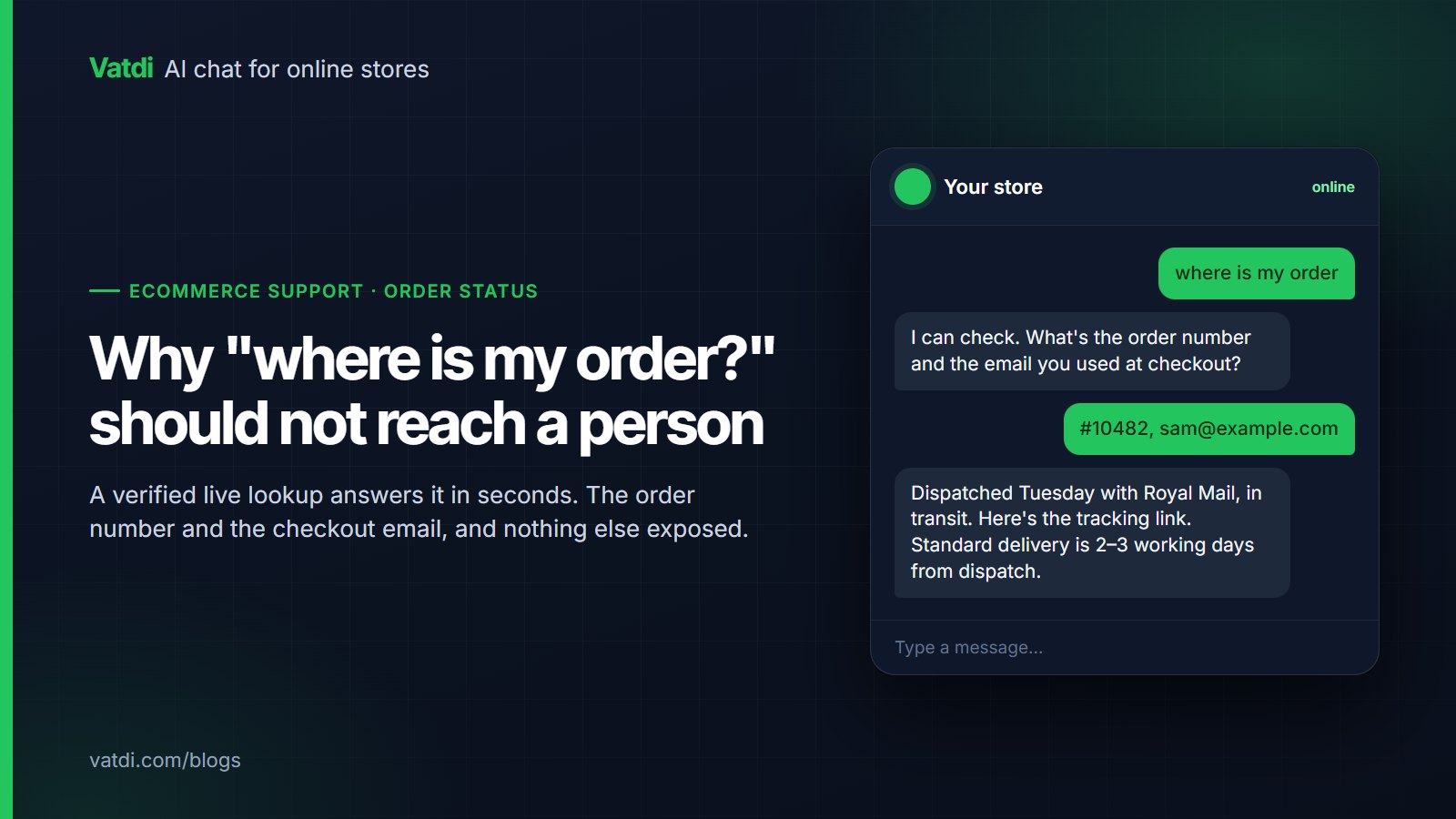
Order tracking in chat answers the most common store support question, "where is my order?", and one a chatbot can answer without a person, provided it reads the order live and shows nothing until the customer gives the order number plus the email or phone on it. Below: how the lookup works, what the bot says at each status, which platforms support it, and how to measure the result.
Why WISMO belongs to the bot, not the inbox
Tag your own support conversations and order status is likely to sit near the top, for a simple reason: every order can generate one, and the customer has no other way to get a current answer than to ask. It is also the most mechanical answer a support team gives: a lookup, a status and a date, repeated with different numbers. Nothing about it needs judgement until something has gone wrong.
High volume and zero judgement is exactly what a chatbot should absorb. A person copying a tracking number from the admin at 22:00 adds nothing the customer could not have received instantly. People's time belongs to the exceptions: the parcel marked delivered that is not there, the address that needs changing after dispatch, the box that arrived crushed. The goal is an inbox where "where is my order" appears only when the answer is not in the order record. A shorter setup walkthrough is at how to track orders with a chatbot.
How order lookup in chat works safely
Order data is personal data. A lookup that shows an order to anyone who guesses a number is a data leak with a friendly interface. The safe pattern has four steps, and the bot should not skip any of them.
- The customer asks. "Where is my order?", "Has 10482 shipped yet?", "I ordered on Monday and nothing has arrived."
- The bot asks for two things: the order number and the email address or phone number used on the order. It asks for both before it looks anything up, and it explains why in one sentence: "To keep your order private I need the order number and the email or phone on the order."
- The bot reads the order live from the store through the store's own plugin, and checks that the email or phone the customer gave matches the one on that order.
- Only on a match does it answer. On a mismatch it says it could not find an order with those details and asks the customer to check them. It does not say which of the two was wrong, and it does not reveal that the order number exists.
Two details matter. The check is live, so a parcel dispatched an hour ago shows as shipped rather than as last night's copy. And the bot should show what the customer needs (status, dates, tracking reference if your platform stores one), not the whole record; payment details and full addresses have no place in a chat reply. Ask any vendor how store credentials are stored before connecting a live store; Vatdi's answer is on its security page.
What the bot should say at each status
A status code is not an answer; "Processing" means nothing without a date. Adapt the wording below to your store's voice but keep the three parts: what is happening, when the next thing happens, and what to do if it does not. The statuses and dates the bot can report are the ones your store records on the order; carrier events such as a delay or a return to sender appear only when your platform writes them to the order.
| Status | What the bot should say | Hand over when |
|---|---|---|
| Processing / awaiting dispatch | "Order 10482 is being prepared and has not shipped yet. Orders placed before 14:00 on a working day usually ship the same day, so yours should ship by [date]. You will get an email with tracking when it does." | The order is past your normal dispatch window |
| Shipped, with tracking | "Order 10482 was shipped on 4 September with [carrier]. Tracking: [reference, where your platform stores one]. The estimated delivery window is 6 to 8 September." | Tracking has not moved for more than your carrier's normal gap |
| Shipped, no tracking | "Order 10482 was shipped on 4 September by untracked post. Delivery is usually 3 to 5 working days, so expect it by 9 September. If it has not arrived by 12 September, tell me here and the team will look into it." | The stated arrival date has passed |
| Delayed | "Order 10482 shipped on 4 September and the carrier has reported a delay. The updated estimate is [date]. I am sorry about the wait. If you would rather speak to the team about options, I can connect you." | The customer asks, or the delay exceeds a threshold you set |
| Delivered | "Order 10482 was marked delivered on 7 September at 11:42. If you do not have it, please check with neighbours and any safe place, then tell me and I will pass it to the team straight away." | The customer says it has not arrived |
| Returned to sender | "Order 10482 is on its way back to us; the carrier recorded [reason]. The team will contact you when it arrives to arrange redelivery or a refund. I can connect you now if you prefer." | Always offer; act on the customer's choice |
| Cancelled / refunded | "Order 10482 was cancelled on 3 September and refunded to your original payment method. Refunds usually appear within 5 working days." | The refund window has passed and the money has not arrived |
Every "delivered but missing" and "delayed" reply ends with an offer of a person. Those are the cases where the fix needs an action, and a bot that keeps repeating the status there is worse than no bot.
Which platforms support live lookup
Live order lookup needs a plugin that can read orders from your store's database on request. Vatdi provides that through its native extensions on the platforms below; the version numbers are the current releases as of September 2026.
| Platform | Integration | Live order lookup in chat |
|---|---|---|
| WordPress / WooCommerce | "Vatdi AI Chat Agent" plugin, version 1.3.2 (WP 5.0+, tested to 6.9) | Yes |
| OpenCart 3.x and 4.x | Extension on the OpenCart Marketplace | Yes |
| PrestaShop 8 and 9 | Module 1.2.0 | Yes |
| Magento 2 / Adobe Commerce | Extension 1.2.1 | Yes |
| Shopware 6 | Plugin 1.2.0 | Yes |
| Joomla 5 and 6 with VirtueMart or HikaShop | Extension 1.2.0 | Yes |
| Drupal 10 and 11 with Drupal Commerce | Module 1.2.0 | Yes |
| Shopify | "Vatdi AI Chat Agent" on the Shopify App Store | No; answers from shipping policy pages and hands over |
| BigCommerce, Wix, Webflow, Squarespace, custom sites | One-line script embed | No; answers from crawled pages and uploads |
Setup is the plugin install plus the store connection; there is no separate order-tracking module. Platform steps are on the WordPress and WooCommerce and OpenCart pages, with the full list under integrations. Order lookup is included on every plan, including Free.
The Shopify exception, honestly
On Shopify, Vatdi installs the widget and trains the AI on the store's pages, collections, policies and the dashboard knowledge base, but it does not read orders live. Live lookup on Shopify is on the roadmap; until it ships, a Shopify store should set the bot up to do two things well.
- Answer the general question from the shipping policy. "Standard UK orders ship within 1 working day and arrive in 2 to 4 working days; you receive a tracking email at dispatch." That resolves the customer who is asking early and simply wants to know whether to worry.
- Collect and hand over the specific question. When the customer wants their own order's status, the bot asks for the order number and email, says a person will check, and passes the conversation to the team with those details attached.
This is not as good as live lookup. It still removes the "what is your order number" back-and-forth and answers the general case instantly. Details are on the Shopify page.
Write the shipping content the bot falls back on
Even with live lookup, the bot leans on your shipping content for the "when should I expect it" half of the answer; on Shopify or a script-embed site it is the whole answer. Write short, dated, numeric entries rather than one long page.
- Dispatch rule. "Orders placed before 14:00 UK time on a working day are dispatched the same day. Orders placed after 14:00, or on weekends and bank holidays, are dispatched the next working day."
- Delivery windows per zone and service, with country names spelled out. "Standard delivery to Ireland: €9.95, 4 to 6 working days. Express delivery to Ireland: €19.95, 2 to 3 working days."
- Tracking. "You receive a tracking email at dispatch. Tracking usually updates within 24 hours of the parcel leaving us."
- What counts as late. "If your parcel has not arrived 3 working days after the end of the delivery window, contact us and we will investigate with the carrier."
- Duties and taxes for non-domestic zones. "Orders to the United States may be subject to import duties, collected by the carrier on delivery. They are not included in our prices."
- Seasonal notices with dates. "Last order date for delivery before 25 December 2026: 19 December for UK standard, 22 December for UK express." Remove them when they expire.
Each entry should stand alone, name the service rather than saying "this option", and include the number, so the bot can quote it accurately in any language.
A handover rule for exceptions
Automating the normal case makes the exceptions visible. Write the rule down so the bot applies it every time.
| Situation | Bot action |
|---|---|
| Marked delivered, customer says not received | Ask about neighbours and safe places once, then hand over with order number, delivery timestamp and the customer's reply |
| Address change requested | State the rule (possible until packed); if still processing, hand over with the new address; if shipped, say the carrier may allow a redirect and hand over |
| Tracking stalled beyond the carrier's normal gap | Give the last recorded status and date, apologise, hand over for a carrier enquiry |
| Damaged or wrong item | Ask for a photo by email (the widget does not take attachments), hand over with the order number |
| Customer asks for a person at any point | Hand over; outside agent hours, state the hours and collect contact details |
Every handover should carry the order number and what the bot already established, so the person picks up mid-conversation. The states a handover passes through are described in what chatbot human handover is.
How to measure the deflection
Deflection here means an order-status conversation that ended without a person being needed. Measure it simply and consistently.
- Baseline first. Before turning lookup on, count order-status conversations across all channels for two weeks. Write the number down; it is the denominator you will compare against later.
- Count bot-resolved order-status chats. After launch, count conversations where the bot gave a status and the customer did not ask for a person, did not email afterwards, and did not rate the answer badly.
- Count the handovers by reason. Missing parcel, address change, damaged item, "just wanted a human". This list is your improvement queue.
- Compute the share. Bot-resolved divided by total order-status conversations. Track it monthly.
- Read the quality scores. If your chatbot grades conversations from 0 to 10 with advice, filter to order-status chats and read the low ones. A low score on a "shipped with tracking" reply usually means a shipping entry is missing a date or the reply lacks the "what to do if late" sentence.
Two signs to watch: rising "delivered but missing" handovers usually point at the carrier, not the bot; rising "just wanted a human" handovers mean the replies are too terse, so add the date, the next step and the offer of a person.
Why this one answer matters more than the others
Order status arrives constantly, mostly outside working hours, and each instance is a small anxiety rather than a purchase decision. Answered in one exchange it costs nothing and reassures; answered badly it produces two more messages at the moment the customer has already paid. Clear delivery information also protects the sale before it happens, which Baymard documents in its research on cart abandonment. The retrieval design that lets the same assistant answer the surrounding policy questions from your pages is described in Lewis et al., 2020.
Frequently asked questions
How does a chatbot verify that a customer owns the order?
The customer supplies the order number and the email address or phone number used on the order. The bot reads the order live from the store and answers only if the contact detail matches the one on the record. On a mismatch it says it could not find an order with those details, without confirming whether the number exists.
Can a chatbot track orders on Shopify?
Not live, through Vatdi, as of September 2026. On Shopify the bot answers general delivery questions from your shipping policy pages and, for a specific order, collects the order number and email and hands the conversation to a person. Live lookup for Shopify is on the roadmap.
Which platforms allow live order lookup in chat?
Through Vatdi's plugins: WooCommerce, OpenCart 3 and 4, PrestaShop 8 and 9, Magento 2, Shopware 6, Joomla with VirtueMart or HikaShop, and Drupal Commerce. Sites using the script embed, such as BigCommerce, Wix, Webflow, Squarespace and custom builds, get answers from crawled pages and uploads only. On those the assistant should say plainly that it cannot see order details and point the customer at their account page or a person, rather than guessing at a status it has no access to.
What should the chatbot say when an order shows as delivered but the customer does not have it?
Give the delivery date and time, ask once about neighbours and safe places, and then hand over to a person with the order number and the customer's reply attached. This is an exception that needs an action with the carrier, and the bot should not keep repeating the delivered status.
Is order tracking included in the plan?
On Vatdi, no. Order status lookup is included on every plan, including the free one, wherever the platform plugin supports it, and there is no separate order-tracking add-on to buy. Other vendors differ, so check whether lookup sits behind a higher tier before comparing headline prices, since it is the single most requested task in store chat.