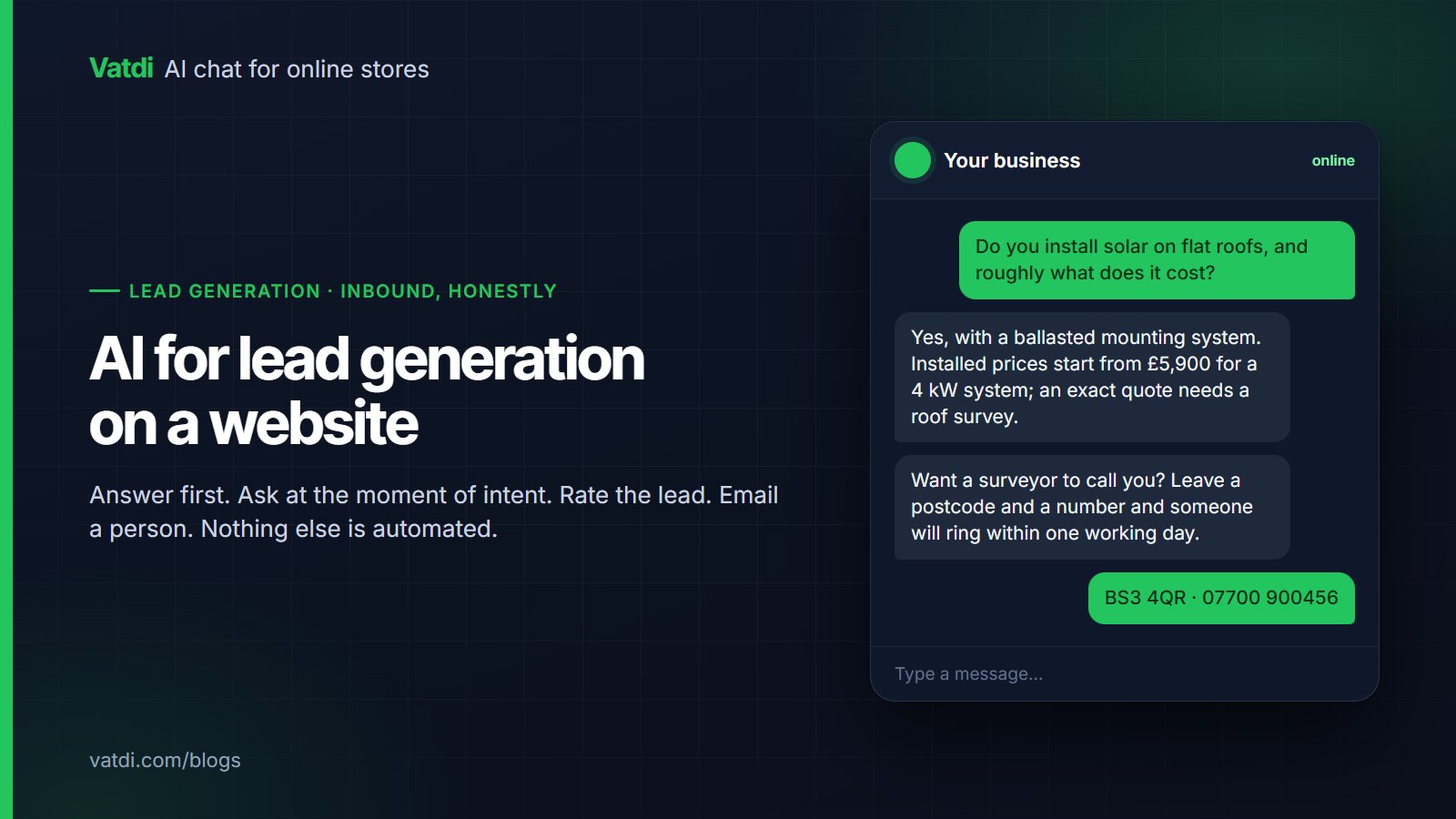
AI for lead generation on a website means a chat assistant that answers a visitor's question first, asks for contact details at the moment of intent, rates the lead for trust and emails a person immediately. It is inbound and conversational, not outbound prospecting, list-building or ad targeting. This guide covers the three mechanisms that produce leads, when and what to ask, forms versus conversation, what the assistant cannot do, the privacy points, and how to measure it.
What "AI lead generation" honestly means on a website
The phrase is used for everything from scraping contact lists to writing cold emails. On a website, the useful version is narrower and more valuable: a visitor with a real question gets a real answer, and the assistant turns that moment into a contact you can follow up. The assistant qualifies inbound intent; it does not create demand. Vatdi's page on AI chatbot for lead generation covers the product; this guide is about running it well, and about the things it should not be expected to do.
The three mechanisms
1. Answer first
Nobody gives their email to a widget that has not helped yet. The assistant answers from your pages, documents and FAQs: what you do, what it costs from, where you are, how the process works. A retrieval-based bot does this by finding the matching passages in your content and writing from them (Lewis et al., 2020), which is why the quality of your service and pricing pages sets the ceiling on the leads you get. If the bot cannot answer the first question, the visitor leaves before the second.
2. Ask at the moment of intent
Intent shows up as specific questions: "roughly what does it cost", "can you do it by March", "do you cover my area", "can someone call me". The assistant is instructed to offer a follow-up at those moments and to ask for the minimum: a name, one contact method, and the one detail a person needs to act (postcode, product, date). Asking earlier produces form abandonment; asking later produces nothing. Vatdi captures leads in the conversation, or through a pre-chat or contact form when you choose; see how to capture leads with a chatbot.
3. Rate, email, follow up by hand
Each captured lead gets an automatic 1–5 trust rating based on the conversation (editable by you), an immediate email to your inbox, and a row you can export to CSV. The rating is triage, not truth: it helps a small team decide who to call first. The follow-up is a person, within the time the assistant promised. The mechanics of the rating are on the lead scoring page.
Form or conversation?
| Approach | When it fits | Cost | Setting |
|---|---|---|---|
| Capture inside the conversation | Most sites; the visitor has been helped and shows intent | Lowest friction | On by default; the assistant asks at intent moments |
| Pre-chat form | You cannot answer anything without details (regulated advice, account issues) | Highest friction; fewer conversations start | Off unless there is a reason |
| Contact form offered by the bot | Outside hours, or when the visitor asks for a callback | Moderate | Offered when a person is not available |
| Quick replies that name the offer | Sites with one dominant intent ("Get a quote") | Low | Set three quick replies; see preset questions |
What to ask for
- One contact method, phone or email, not both.
- A name, so the follow-up is not "Dear customer".
- The one detail a person needs to act: postcode for a site visit, product or service for a quote, preferred day for a call.
- A stated follow-up time from you, not from them: "someone will ring within one working day".
Everything else can be asked by the person who calls. Every extra field before the first answer costs conversations, and the assistant's job is to make the handover easy, not to complete your CRM record.
What the assistant cannot do
- Push leads into a CRM automatically. Vatdi has no CRM, Zapier, webhook or email-marketing connectors; leads arrive by email and CSV export. For a small team that is workable; for a sales org with routing rules, a tool with native CRM sync is the better fit.
- Enrich or verify contacts. The trust rating reflects the conversation, not a database lookup.
- Run outbound sequences or follow-up emails. The follow-up is a person.
- Book a confirmed appointment. It can state your hours and capture a preferred time; a person confirms the slot.
- Work on channels other than your website. WhatsApp works through your own WhatsApp Business number; no Messenger, Instagram, SMS or email inbox.
Knowing these before launch prevents the most common disappointment, which is expecting a chat assistant to behave like a marketing automation platform.
Privacy: two points that matter
A lead is personal data. Two things keep it simple: tell visitors what you will do with the details in the same message that asks for them ("so a surveyor can call you about this quote"), and keep the follow-up to that purpose unless they agree to more. If you later want to send marketing, that is a separate consent under most regimes; the UK regulator's guidance on UK GDPR explains the distinction, and our GDPR checklist for AI chat covers retention, export and deletion for the chat vendor. Vatdi exports and deletes lead data on request and lists its sub-processors on the trust page.
Measuring lead generation without fooling yourself
| Number | How to read it | If it is wrong |
|---|---|---|
| Leads per week | Trend, not level; compare to conversations started | Few leads, many chats: the ask is arriving too late or the content is not answering |
| Rating distribution | Share rated 3 or above | Mostly 1–2: the ask is too early, or a form is gating the first answer |
| Reply rate to follow-ups | Contacts reached within the promised time | Low: the promise in the widget is not being kept; fix the process, not the bot |
| Converted leads | Quotes sent, jobs booked, sales made, tracked by hand or in your CRM after import | Low with good ratings: the follow-up itself needs work |
Vatdi's leads report shows the leads, their ratings and export on every plan; the wider set of chatbot numbers is in AI chatbot KPIs to track. For placement and content on a SaaS site specifically, see AI chatbot for SaaS websites; for the general set-up, AI chatbot for your website. Lead capture, rating and the reports are on every plan, including Free; plans differ only in monthly conversations (pricing).
Frequently asked questions
Is an AI chatbot better than a contact form for lead generation?
It is better at the moment of intent, because it has just answered the visitor's question and can ask for one contact detail in context; a static form asks for everything before helping. It is not a replacement for a form on pages where a form is expected, such as a quote page. Use both: the form for visitors who arrive ready, the assistant for the ones who arrive with questions.
How does the lead rating work, and can I trust it?
Vatdi rates each captured lead 1–5 from the conversation: the specificity of the request, the contact details given, and signals such as a stated timeline. It is triage for a small team deciding who to call first, and you can edit it. It is not enrichment or verification; a 5 is a promising conversation, not a confirmed budget. Watch the distribution over weeks rather than trusting single scores.
Will the chatbot send leads to my CRM?
Not automatically. Leads arrive by immediate email and can be exported to CSV for import into a CRM or newsletter tool; there are no CRM, Zapier or webhook connectors. For a business with a handful of leads a day that is fine. If your sales process depends on automatic routing, enrichment or sequences, choose a tool with a native CRM integration; that is a genuine reason to look elsewhere.
When should the assistant ask for contact details?
After it has answered something useful and the visitor shows intent: a cost question, an availability question, a request for a callback, or a question the bot cannot fully answer without a person. Asking on the first message or gating the widget behind a form lowers both conversations and lead quality. Keep the ask to a name, one contact method and the single detail a person needs to act.
Can the chatbot generate leads outside business hours?
Yes, and that is where it earns most of its keep. It answers from your content at any hour, and when a person is not available it says so honestly, states when someone will reply, and captures the contact for the follow-up. Set real agent hours so the offline notice is accurate, and review the overnight leads first thing; a stated callback time that is then missed is worse than no promise.
Does lead capture cost extra?
On Vatdi, no. Lead capture in chat, the pre-chat and contact forms, the 1–5 trust rating, instant email and CSV export are on every plan, including Free with 15 conversations a month; Starter is $4.49 a month for 150 and Grow $7.49 for unlimited, as of September 2026. Per-seat tools charge for each person who follows up, which for a small team is the larger cost.