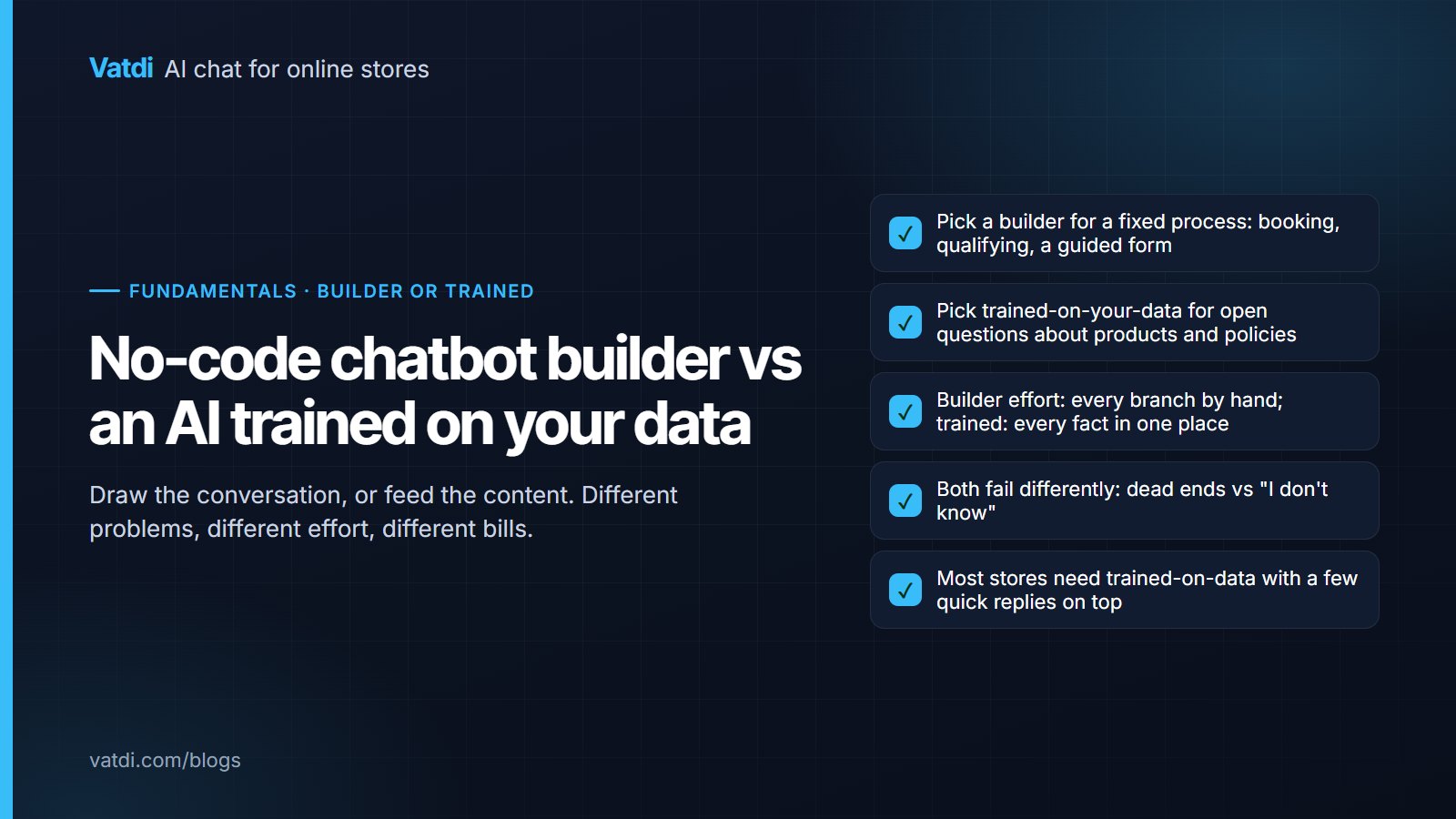
A no-code chatbot builder lets you draw the conversation as a flow: menus, branches, buttons and forms that you design in advance. An AI trained on your own data reads your products, pages and documents and answers whatever the visitor types. They solve different problems. A builder is right for a fixed process; trained-on-your-data is right for open questions. This guide shows what each does well, the effort each really takes, prices as of September 2026, and how to choose.
Two different machines
A builder produces a decision tree. Every path the visitor can take exists because someone drew it: "Track my order" leads to "Enter your order number" leads to a lookup or a link. Anything outside the tree gets "I didn't understand that" or a fallback to a person. A retrieval-based assistant produces no tree at all. For each message it searches your content for the matching passages and writes an answer from them, declining when nothing matches; the method is described in Lewis et al., 2020 and explained in plain words in how a RAG chatbot answers from your content. The first machine is predictable and narrow; the second is broad and only as good as the content behind it.
| Dimension | No-code builder | AI trained on your own data |
|---|---|---|
| What it handles | The paths you drew | Any question your content answers |
| Unexpected phrasing | Fails unless a keyword matches | Handled; meaning-based retrieval |
| Setup effort | Hours to weeks drawing flows | Minutes to connect; an afternoon on content |
| Maintenance | Edit the flow for every change | Edit the page or product; the answer follows |
| Failure mode | Dead ends and loops | "I don't know" when content is missing; wrong answers when content is stale |
| Best at | Bookings, lead qualification, guided forms, fixed FAQs | Product questions, policies, order status, anything with many phrasings |
| Data needed | Your flow design | Your catalogue, pages, FAQs, documents |
What a no-code builder is genuinely good at
- A fixed process with required steps: booking a slot, collecting a quote request field by field, qualifying a lead with three questions in order.
- Compliance-sensitive scripts where the wording must be exactly what legal approved, every time.
- Channels where buttons beat typing: Messenger and WhatsApp bots are mostly button flows, which is why ManyChat and Chatfuel are builders.
- A very small, stable FAQ that never changes and has five answers.
The catch is scale. A store with 300 products and twelve policies cannot draw a branch for every question a shopper might ask, and the builder's fallback ("I didn't understand") is the experience most people mean when they say they hate chatbots. The older rule-based comparison is in AI chatbot vs rule-based chatbot.
What trained-on-your-data is genuinely good at
- Open questions with many phrasings: "does the 40L fit under a seat", "is the blue one back in stock", "can I return sale items".
- Content that changes: prices, stock and policies update in the source and the answers follow; no flow to edit.
- Languages: the visitor's language is detected and the answer written in it from content in yours.
- Honest declines: when the content does not cover it, the bot says so and offers a person.
The catch is dependency: a retrieval bot is exactly as good as the passages it can find. A missing shipping page or an attribute stored only in an image produces "I don't know" or a vague answer, and a stale promotion page produces a confident wrong one. The fixes are content work, described in how to train a chatbot on your data.
The effort, honestly compared
Building a flow for a real store means anticipating questions, which is the hard part; you find out what you missed from the dead ends. Training on your data means writing the shipping, returns and sizing pages one question per heading, filling product attributes, and reviewing the low-rated conversations weekly. The second set of tasks improves the store even without a bot, which is a point in its favour; the format is in how to write a chatbot knowledge base.
The hybrid most stores actually want
A retrieval-based assistant with a few builder-style elements on top: three quick replies for the most common questions, a welcome message that names what the bot can do, a pre-chat form only where you genuinely need details first, and explicit handover rules. That gives shoppers buttons for the obvious and typing for everything else, without anyone drawing a tree. Vatdi works this way: quick replies and the welcome message are settings (preset questions), and the answers come from the synced catalogue and pages; the general shape is described in no-code AI chatbot builder and how to build an AI chatbot without coding.
Prices, as of September 2026
| Tool | Kind | Entry price | Note |
|---|---|---|---|
| Landbot | No-code builder | Starter €40/mo, Pro €100/mo | Flow builder |
| Botpress | Builder with AI, developer-oriented | Free tier with credits; Plus $89/mo; Team $495/mo | Building is your work |
| HubSpot | Rule-based builder in free tools | Free; paid hubs from about $15–20 per seat | Fits sites already on HubSpot |
| ManyChat / Chatfuel | Messaging-app builders | ManyChat Pro from $15/mo; Chatfuel from $19.99/mo | Messenger, Instagram, WhatsApp |
| Chatbase | Trained on uploaded content | Free; Hobby $40/mo | Documents rather than catalogue |
| Vatdi | Trained on catalogue, pages and uploads | Free (15 conversations); $4.49 (150); $7.49 unlimited | Plugins for WooCommerce, OpenCart, PrestaShop, Magento, Shopware, Joomla, Drupal; script for any site |
Sources: Landbot pricing and Vatdi's pricing page; prices change, check each vendor. The builders are ranked in best no-code chatbot builders.
How to choose, in five questions
- Is the job a fixed process or open questions? Booking and qualifying favour a builder; products and policies favour trained-on-data.
- How many distinct questions arrive in a month? Under a dozen, a flow is manageable; above that, drawing branches does not scale.
- Does the content change weekly? If prices and stock move, you want answers that follow the source.
- Which channel? Messenger and WhatsApp are button territory; a website widget can take typed questions.
- Who maintains it? A flow needs someone who understands the diagram; content needs someone who can edit a page.
If your answers are "open questions, many, changing, website, the person who edits the site", you want trained-on-your-data with quick replies on top. The design principles for the conversation itself, whichever you pick, are in the chatbot conversation design guide, and what a store bot needs specifically is in what an AI chatbot for ecommerce is.
Frequently asked questions
Is a no-code chatbot builder the same as an AI chatbot?
No. A builder produces a decision tree of menus and branches that you draw; the visitor can only go where a path exists. An AI trained on your own data has no tree: it reads your products, pages and documents and answers typed questions, declining when the content does not cover them. Some builders now add AI steps, and some AI tools add quick replies, but the underlying machines are different.
Which is easier to set up?
Trained-on-your-data is faster to connect: a plugin or one script, then the content it reads. A builder is quick for a five-branch flow and slow for a real store, because every question needs a branch. The ongoing effort differs too: a builder needs the flow edited at every change, while a trained assistant follows your pages and asks for a weekly review of low-rated conversations.
Can a no-code builder answer product questions?
Only the ones you anticipated and drew. "Is the medium in stock in blue" for 300 products is not a flow anyone can maintain. A retrieval-based assistant answers it from the synced catalogue, with a product card, and follows stock changes without edits. Builders remain the right tool for fixed processes such as booking a slot or qualifying a lead field by field.
What does "trained on your own data" actually mean?
That the assistant retrieves the relevant passages from your content for each question and writes only from them, rather than learning your business into the model. Nothing is trained in the machine-learning sense; content is indexed and searched. The consequence is practical: update a page and the next answer changes, and a question your content does not cover gets an honest "I don't know".
Which costs more?
As of September 2026 the entry prices overlap: Landbot from €40 a month, Botpress from free with credits to $89, ManyChat from $15, Chatbase from free to $40, Vatdi from free to $7.49 flat. The larger cost is time: drawing and maintaining flows versus writing and maintaining content. Price the effort for your own question volume, not just the subscription.
Can I use both together?
Yes, and most stores should, in a light form: a retrieval-based assistant for typed questions, with three quick replies, a welcome message and handover rules providing the button-style structure. That gives visitors the obvious paths without a tree and the open answers without a script. Vatdi's quick replies and welcome message are settings on every plan; no flow diagram is involved.