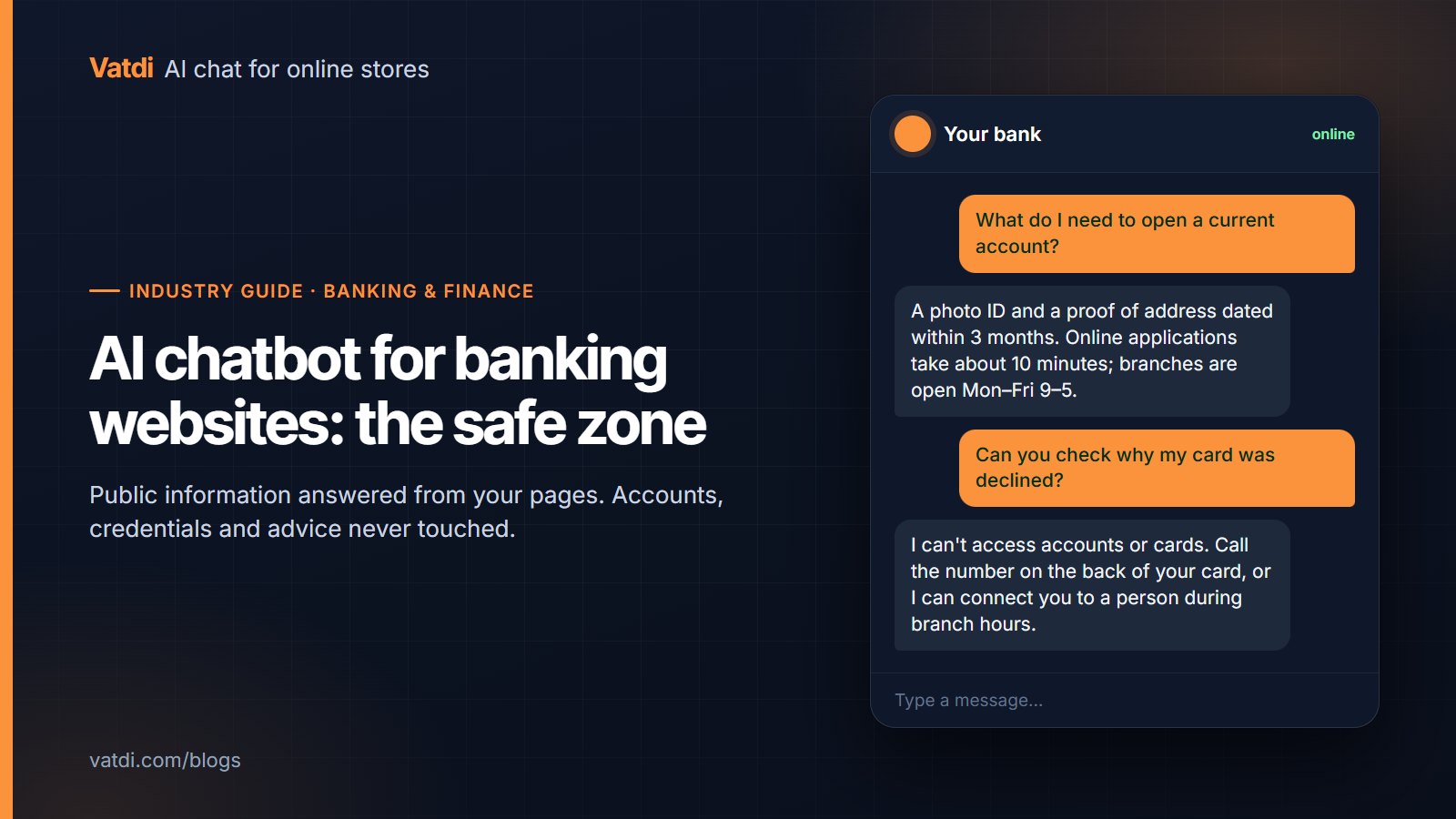
An AI chatbot for banking and finance websites is safe and useful within one boundary: public information. It can answer from the pages you already publish, such as products, published rates and fees, documents needed to open an account, branch hours and how-to steps, and it must never touch accounts, cards, credentials or personal financial advice. This guide draws that line precisely, with the handover rules, the security wording and the content to feed the bot.
Why the boundary matters more than the features
On a store, a chatbot's worst failure is a wrong delivery date. On a bank's website it is a visitor believing the bot can see their account, or a bot improvising an answer that sounds like advice. Both are avoidable by design rather than by hoping the model behaves: give the bot only public pages to read, instruct it explicitly on what it declines, and route everything else to staff through a channel that verifies identity. A retrieval-based bot answers from the passages it finds in your content and says it does not know otherwise (the approach is described in Lewis et al., 2020), which is the right architecture for this boundary. Vatdi's banking and finance page covers the product; this guide is about running it responsibly.
The safe zone: what it can answer
| Question | Source page | Bot answers? | Condition |
|---|---|---|---|
| Which accounts or cards do you offer, and what are the fees? | Product pages, fee schedule | Yes | Fees written as text, not only in a PDF table image |
| What is the published rate on X? | Rates page | Yes, with "as of" the page date | Crawl the rates page at least daily |
| What documents do I need to open an account or apply? | Application requirements page | Yes | Keep the list current per product |
| Branch and phone hours, locations, holidays | Contact and branch pages | Yes | One page per branch or a table |
| How do I reset my online banking password? | Help centre article | Yes: the steps and the link; never the reset itself | Bot must not collect any credential |
| How do I report a lost card or fraud? | Security page | Yes: the number and steps, immediately | Put this in quick replies |
| What is a standing order / APR / overdraft fee? | Glossary, help centre | Yes, as definitions | Definitions, not recommendations |
The human zone: what it must not do
- Anything about a specific account, card or transaction. Balances, declined payments, disputed charges, application status. The bot has no access and must say so, then point to the verified channel (phone number on the card, secure messaging inside online banking) or hand over to staff.
- Credentials and personal data. The bot never asks for passwords, PINs, one-time codes, full card numbers or identity documents, and it says so in its welcome message. This protects visitors from treating any chat window as a place to type secrets.
- Advice. "Should I fix my mortgage?" and "Which ISA is best for me?" are regulated advice in most jurisdictions. The bot explains what the products are, from your pages, and refers the person to an adviser or the relevant appointment page.
- Complaints in progress. Capture the reference and hand over; do not restate policy at someone who has already been through it.
- Outages. If online banking is down, the bot must not claim otherwise. Vatdi has no live status monitoring; point to your status page and let the offline notice be honest.
Write these as explicit rules in the bot's instructions and test each one with a real question before launch. The handover mechanics (agent hours, alerts, team inbox, transcript) are described in what chatbot human handover is.
Security wording that protects visitors
Three short pieces of text do a lot of work. In the welcome message: "I can help with products, fees, documents and how-to questions. I can't see accounts and will never ask for passwords, PINs or card numbers." In the offline notice: the hours a person is available and the fraud line, which is open regardless. In the decline for account questions: the verified channel, stated the same way every time. Consistency is a security feature; a visitor who has seen the same wording ten times will notice a phishing page that says something different.
Privacy and data handling
Even within the safe zone, visitors type things they should not, and every message is processed by the chat vendor and its AI provider. Run the same checks you would for any processor: a data processing agreement, a public sub-processor list, encryption in transit and at rest, stated retention periods, and export and deletion on request. Vatdi's answers are on its trust page; as of September 2026, message text goes to OpenAI through its API (zero-retention mode where enabled, not used for training), LLM call logs are kept 90 days and backups roll off after 10 days, and no SOC 2 or ISO 27001 certification is claimed. If your compliance team requires certifications or a specific data region, ask for them in writing before launch and treat a vendor's inability to provide them as a decision, not an obstacle. The full checklist is in our GDPR checklist for AI chat, and the UK regulator's guidance on processors applies directly (ICO UK GDPR guidance).
Content to feed the bot, in order
- Fraud and lost-card page, with the phone numbers in text. Put it in quick replies.
- Product pages and the fee schedule, fees written as text with the product named on each line.
- Rates page, crawled daily, with the effective date on the page.
- Application requirements per product: documents, eligibility, time to open.
- Branch and contact pages, including holiday hours.
- Help centre articles for online banking how-tos.
- A short "what this assistant cannot do" page the bot can quote when declining.
Do not upload internal procedures, staff manuals or anything containing customer data. The FAQ pattern that retrieves best is covered in AI chatbot for FAQ automation.
After hours and languages
Most public-information questions arrive outside branch hours, which is the case for the bot in the first place. Set real agent hours so the offline notice is accurate, keep the fraud line visible at all times, and turn on alerts so overnight handover requests are seen first thing; see AI chatbot for after-hours support. For multilingual communities, the bot detects the visitor's language and answers from your pages in it, with widget labels that switch; test ten questions per language, and keep product names and regulatory terms untranslated where your pages do (multilingual AI chat).
Measuring the first month
Four numbers tell you whether the boundary holds and the bot helps: public-information questions answered without staff; the count of account or credential questions correctly declined and routed (read a sample of these transcripts weekly); missed handovers within agent hours; and the visitor rating. A rising decline count is not a failure; it means visitors are being taught where the verified channels are. Vatdi grades every conversation 0–10 with plain-English advice, which turns the weekly review into a list. Installation is a one-line script on any site (install on any website), and every feature is on every plan; the plans differ only in monthly conversations (pricing).
Frequently asked questions
Can a website chatbot check my balance or a transaction?
Not a website assistant of this kind. It reads the public pages it is given and has no connection to core banking systems, so it cannot see balances, transactions, applications or card status, and it must say so clearly. The correct behaviour is to name the verified channel, the number on the card or secure messaging inside online banking, or to hand over to staff during hours. Vatdi is built this way deliberately.
Is it safe to put an AI chatbot on a bank's website at all?
Within the public-information boundary, with explicit decline rules and consistent security wording, yes. The risks come from scope creep: letting the bot near account data, credentials or advice. Keep the content it reads public, instruct it to refuse anything that needs identity or judgement, test those refusals before launch, and review a sample of declined conversations weekly. The privacy checks for the vendor apply as for any processor.
How should the bot respond to someone reporting fraud?
Immediately and without questions: give the fraud line and the lost-card number from your security page, tell them what to expect on the call, and offer a handover if staff are available. Put "Report fraud or a lost card" in the quick replies so nobody has to type it. The bot should never attempt to verify identity or collect card details itself; its job is to get the person to the right channel in seconds.
Will the chatbot give financial advice?
It must not, and you should instruct it explicitly. It can explain what a product is, what the published rate or fee is and what the eligibility criteria say, all from your pages. When a visitor asks what they should do, the bot refers them to an adviser or the appointment page. Publish a short page stating what the assistant cannot advise on, so it can quote your own words when it declines.
What data does the chatbot store, and where?
Ask the vendor and write the answer into your privacy notice. For Vatdi as of September 2026: message text is sent to OpenAI via API (zero-retention mode where enabled, not used for training), LLM call logs are retained 90 days, encrypted backups roll off after 10 days, and conversation data can be exported as JSON and deleted on request; sub-processors are listed on the trust page. Vatdi does not claim SOC 2 or ISO 27001 certification.
Does this work for a credit union, building society or fintech?
Yes; the boundary is the same wherever regulated products and customer accounts are involved. Smaller institutions often benefit most, because after-hours public-information questions are a large share of their contact volume and staff time is scarce. Start with the fraud page, fees, application requirements and branch hours, run twenty real questions against the bot, and confirm every account or advice question is declined and routed before going live.